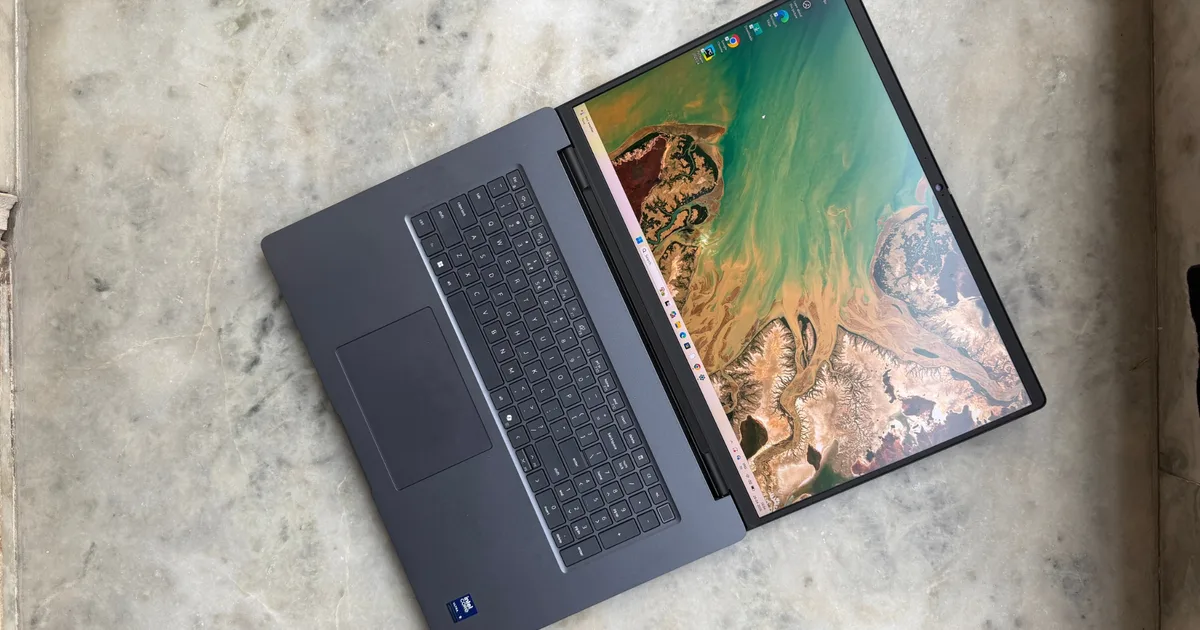
Dell Pro Max 18 Plus
MSRP $14,000.00

“Unapologetically beefy, and pricey for a purpose.”
Pros
- Blistering performance
- Plenty of RAM and storage
- Big, beautiful screen
- Generous port selection
- Pretty solid build
Cons
- Very expensive
- Big and bulky
- OLED screen is amiss
- Tight arrow keys
- Gets hot and noisy
I test laptops for a living, and have grown a bad habit out of it. The moment a top-tier machine lands on my desk, I immediately try to push it until I find the cracks. The render that stalls, the fan curve that gives up, or the throttling wall that turns a specs sheet into mere marketing fiction. I went into the Dell Pro Max 18 Plus fully expecting to find that hurdle. Instead, I spent two weeks watching an 18-inch slab absorb everything I threw at it and keep asking for more. It even surprised the engineers at an AI lab who pitted it against their trusty training desktop.
This is not a laptop in the way most people mean the word. Instead, I’d call it a desktop tower that happens to fold shut. And after living with it, benchmarking it, and lugging it through an airport that judged me harshly for it, I’m convinced it’s one of the most uncompromising machines money can currently buy, with all the brilliance and baggage in tow. It’s generous ports, decent display, and plenty of firepower inside. There are some flaws, but nothing that would make it an instant turn-off.
The biggest roadblock is the asking price. When it first hit the shelves, the configuration I tested used to go for around $9,000, though the entry-point trims were priced at roughly $3,500. At the time of writing this review, Dell’s online configurator puts the final price of my review unit at roughly $14,000, which is obscene. The slightly slower variant with an RTX PRO 3000 Blackwell GPU (with half the VRAM) is now listed at $8,358. Ultimately, you have to think of this machine as the Rolls-Royce Cullinan or Rezvani Vengeance of the laptop world. It’s big, tough, and packs plenty of grunt. Of course, you must pay for all that luxury.
Dell Pro Max 18 Plus specs: What’s crammed inside the massive shell?
Here is the two-column technical specification sheet for the Dell Pro Max 18 Plus:
| Model Number | Dell Pro Max 18 Plus, MB18250 |
| Processor | Intel Core Ultra 5 245HX, Ultra 7 265HX, or Ultra 9 285HX (up to 5.5 GHz, 55 W) |
| Operating System | Windows 11 Pro, Windows 11 Home, or Ubuntu Linux 24.04 |
| Memory | CAMM Modules: Up to 256 GB (Single-channel) or 128 GB (Dual-channel) CSODIMM Modules: Up to 96 GB (Non-ECC) |
| Primary Storage | 512 GB to 4 TB SSD (Gen4 SED) or 1 TB to 2 TB SSD (Gen5 SED) |
| Video Card | Integrated: Intel Graphics Discrete: NVIDIA RTX PRO 5000 Blackwell (24 GB GDDR7) |
| Display | 45.7cm (18″), Non-Touch, QHD+ 120Hz, WVA, 100% DCI-P3, 500 nits, Low Blue Light |
| Keyboard | Multiple language options, backlit/non-backlit, Copilot key, numeric keypad (99-key to 103-key options) |
| Touchpad | Precision touchpad |
| Ports | 2x Thunderbolt 5, 1x Thunderbolt 4, 2x USB 3.2 Gen 1 (one with PowerShare), 1x HDMI 2.1, 1x RJ45 (2.5 Gbps), 1x Global headset port |
| Slots & Drives | 1x SD-card slot, 1x smart card reader slot, 1x noble lock slot No optical drive |
| Dimensions & Weight | Height (rear): 19.56 mm Width: 402 mm Depth: 279.95 mm Weight (minimum): 3.25 kg (7.17 lb) |
| Camera | 1080p 30 fps HDR FHD RGB camera OR 8MP 30 fps HDR RGB+IR camera (with Ambient light sensor) |
| Audio and Speakers | Stereo speakers with Cirrus Logic CS42143 Audio Controller, 2 W x 2 |
| Primary Battery | 6-cell, 96 Wh, Lithium Ion (ExpressCharge Boost) |
| Power Adapter | 165 W or 280 W AC adapter, USB Type-C |
| Security Hardware | Noble lock slot, Windows Hello Fingerprint Reader, TPM 2.0 (FIPS 140-2), ControlVault 3 Plus, Chassis Intrusion Detection |
| Sensors | Accelerometer, Gyro, Ambient Light Sensor (8MP camera only), Hall Effect Sensor |
Dell Pro Max 18 Plus design and build: A desktop that forgot it was supposed to be portable
This is one big machine. Naturally, the first thing I did was weigh it, because the number felt fake on paper. My test unit tipped my kitchen scale at just under 8 pounds. The footprint is fairly generous, too. When I set it on my desk, it stayed exactly where I put it. There is no nudging this behemoth with a careless elbow bump or swipe.

The rest of the industry has spent a decade chasing thin-and-light machines. Dell, refreshingly, did not get the memo. There’s no RGB theater here, no aggressive gamer angles. This isn’t that kind of performance machine. It’s just a dark gray, almost aggressively boring slab with a small logo on the lid. It looks like it belongs in an engineering firm or on a film set, and I mean that as a compliment.
What I didn’t expect to admire was the sustainability story underneath. The top and bottom covers predominantly use recycled magnesium, which gives the deck a cool, rigid, and completely flex-free feel even when I pressed hard enough. The palm rests and bumpers fold in recycled plastics, and the battery uses recycled cobalt. The whole unit passes MIL-STD-810H testing, and after two weeks of careless handling, I believe those claims because I don’t see any dents or scuffs spoiling the pristine looks.
As I took the bottom panel off, the Dell Pro Max 18 Plus showed me a new side of its personality that goes beyond being big and bulky. This is where you see a genuinely impressive side of the machine. There are slots for four M.2 NVMe SSDs, which is almost unprecedented for an average laptop. My test unit shipped with two PCIe 5.0 drives in RAID 0 configuration, but the room to add two more storage drives is the kind of practical convenience that would make data hoarders weep with sheer joy.

The CAMM2 memory implementation, however, is the real headline grabber here. By ditching traditional SODIMM slots, Dell freed up enough board space to support an absurd 256GB of DDR5-6400 RAM. There’s a CAMM2-to-SODIMM adapter for legacy holdouts, though it caps you at 192GB. Dominating the rest of the real estate is the cooling system. There are three fans and a tangle of thick heat pipes built to handle a 175W GPU and a power-hungry Intel CPU.
The ports are exactly as generous as a desktop replacement should be. Unlike those ginormous gaming laptops, which often hoard a healthy chunk of ports on the rear edge, Dell puts them on the sides where they are easily accessible. On the left, there’s a 2.5 Gbps Ethernet port, an HDMI 2.1 inlet, two Thunderbolt 5 (80 Gbps) ports with DisplayPort and Power Delivery support, a full-size SD reader, and an optional Smart Card reader.
On the right side, you will find a 3.5mm audio combo jack, one Thunderbolt 4 (40 Gbps) port, two USB-A 3.2 Gen 1 ports, and a Noble lock slot. The whole kit charges over a single beefy 280W USB-C adapter. Moreover, the Thunderbolt 5 ports are modular, which means they can be replaced discretely without having to rip apart the motherboard. I highly appreciate this convenience, especially because this is one pricey laptop that you want to push for at least a few years.
Score: 8/10
Dell Pro Max 18 Plus display: I yearn for more

As you open the lid on this hulking laptop, you will be greeted by an 18-inch display with a 16:10 aspect ratio. It’s huge, especially for someone like me who rarely ever crosses the 13-inch territory on laptops. Naturally, window management emerged as the first sigh of relief on the Dell Pro Max 18 Plus. Adobe Premiere timelines stretched out luxuriously, and I could run two IDEs side by side with documentation open without squinting. The real estate alone justifies a chunk of the bulk.
The panel itself is a QHD+ (2560 x 1600) IPS LCD running at 120Hz, and it’s the only option across every configuration. That’s worth sitting with for a second. In my testing, it peaked just past 500 nits, bright enough for a sunlit office or outdoor shade. Notably, the matte coating diffuses glare pretty well, though I couldn’t help but notice a faint grainy cast against pure white backgrounds.
And this is where the honeymoon phase ended for me. For a machine that hands you a five-figure bill, locking the 18-inch model to a single QHD+ IPS panel is a frustrating decision, especially when the smaller 16-inch sibling offers a gorgeous 4K OLED touchscreen. The 18-inch variant gets none of that display goodness or flexibility. And IPS being IPS, it can’t touch OLED’s inky blacks or rich color saturation. I noticed faint ghosting during fast 3D animation playback.
One can argue that for an “AI workload” audience, a snazzy display doesn’t matter too much. But this machine isn’t doing that. It can handle 3D modeling, media production, and more such chores without breaking a sweat. And for those tasks, a color-accurate OLED panel matters. A lot. Overall, I’d say that the Dell Pro Max 18 Plus’ display is sufficiently bright, accurate, and productive, but it’s not the flawless showpiece that the asking price would otherwise suggest.
Score: 8/10
Dell Pro Max 18 Plus keyboard and trackpad: One fights you, the other doesn’t

Given the sprawling 18-inch deck, I assumed that the input experience on the Dell Pro Max 1₹8 Plus would be effortless. Well, it’s a mixed bag that nails the basics and then trips over its own shoelaces. Typing on it is a pleasant experience.
The keys offer an ample amount of travel, coupled with a soft landing at the bottom of each stroke and a springy feedback. The deck that doesn’t flex at all, and the clean white backlight against dark grey keycaps stayed legible in a dark room. There’s also a full numpad, which is not surprising given the form factor and is an absolute must-have for the intended audience.
The layout, however, made me grind my teeth. Despite the enormous deck estate, Dell still squished the up and down arrows into half-height keys wedged between full-size left and right direction keys. I struggled aplenty with navigation in the early days, especially while coding or just plain old editing chores.
There are also no dedicated Home, End, Page Up, or Page Down keys to be found here. Instead, they’re buried as secondary functions. On a machine as big as this one, that’s not a compromise. It’s an unforced error. The trackpad, thankfully, is excellent. It’s massive, responsive, silky-smooth, and offers reassuring click feedback. The fingerprint reader embedded in the power button was also reliably quick at its intended job.
Score: 7/10
Dell Pro Max 18 Plus performance: I couldn’t make it flinch

Unflinching raw performance is the whole reason that the Dell Pro Max 18 Plus exists, so I leaned on it hard. My review unit came equipped with Intel’s Core Ultra 9 285HX silicon, a 24-core, 24-thread chip with eight performance cores boosting to 5.5 GHz and 16 efficiency cores hitting 4.6 GHz. In Cinebench R23, multi-core scores sat comfortably ahead of AMD’s Ryzen AI 9 HX Pro processor.
HandBrake transcoding, which usually puts regular laptops on a crawling mission, finished in a fraction of the time on the Dell machine. The catch, however, is the thermal tax. When subjected to looping Cinebench R15 tests, thermal throttling visibly kneecapped the processor from delivering sustained performance that it can otherwise easily manage for short bursts. The behavior is not surprising for a power-hungry chip like this one, but it’s definitely worth keeping in mind, depending on whether your daily work requires sustained peak performance or if you only need elite power for short bursts of intensive work.
Now, let’s jump to the graphics prowess, an area where this machine tries to pass off as a portable supercomputer. The Nvidia RTX Pro 5000 Blackwell GPU, with 24GB of GDDR7 VRAM and a 175W TDP, simply refused to struggle. I ran real-time architectural ray-tracing and purely for science, played Cyberpunk 2077 on Ultra at over 100fps during a break. That 24GB of VRAM matters most for the AI crowd, who can run sizable local LLMs and Stable Diffusion instances without ever touching a cloud server.

The generous memory and speedy storage also keep up with the pace of demanding chores thrown its way. With up to 256GB of DDR5-6400 CAMM2 RAM, out-of-memory errors are a rarity. The dual PCIe 5.0 SSDs in RAID 0 posted sequential reads beyond 16,000 MB/s, putting even the MacBook Pro to shame. Needless to say, launching massive Creative Cloud apps or moving terabytes of raw footage felt instantaneous.
Cooling all of this takes air, and you hear it. At idle and during light browsing, the three fans were effectively silent at around 30 dB. Under full load, they ramped into a noticeable whoosh that hit over 50 dB, which is tangibly loud, but low and consistent enough that I tuned it out faster than the shrill whine of smaller gaming machines. Surface temperatures stayed reasonable except near the rear vents and bottom center, which reached 47°C (117°F). Simply put, under heavy load, this machine must live on a desk, not a lap. Just for the sake of comparison, most gaming laptops that I have tested usually go beyond the 50°C (122° Fahrenheit) mark within 15 minutes of gaming.
AI training tests, however, exposed its only key weakness of this machine. As the tech adage goes, synthetic benchmarks only offer a superficial picture of what a machine can truly accomplish. I wanted to see how the RTX Pro 5000 behaved under the kind of sustained, punishing compute it’s actually sold for. So, I handed it off to my sister, who runs deep learning workloads and AI training workloads for a living at her biorobotics startup. For testing, she tried a demanding medical-imaging training pipeline on it.

The result is the most revealing stress test in this entire review, because it found the wall I couldn’t. Her setup was deliberately unforgiving and tightly controlled. She ran a supervised YOLOv8 convolutional neural network, which she told me is an object-detection model doing simultaneous bounding-box regression and multi-class classification — on a dataset of 871 annotated 2D medical images, mapping detected features to one of 13 diagnostic or anatomical classes, across 200 full epochs.
Then she ran the identical workload within the same Python environment, config file, locked batch size, and image resolution, so the FLOPs per epoch were exactly equal on a desktop packing an older Nvidia GeForce RTX 3060 graphics card. The only meaningful variable was the hardware. A background daemon polled nvidia-smi every five seconds for the whole run, logging GPU utilization, VRAM, die temperature, and power draw.
The raw speed is genuinely staggering
The Dell Pro Max 18 Plus chewed through all 200 epochs in 0.92 hours (or 55.48 minutes to be specific), averaging 16.64 seconds per epoch. The Nvidia GeForce RTX 3060 GPU packed inside the desktop took 1.79 hours, or 107.24 minutes, at 32.17 seconds per epoch. That’s the Blackwell mobile chip finishing a serious training job in barely half the time of a desktop-bound graphics unlocked without any power limits. Throughput was no different.

The Dell Pro Max 18 Plus produced 52.33 images per second, while the generative output on the desktop stood at 27.07 images on average. The efficiency gap was also massive. The Dell laptop hit 0.5753 images per second per watt, nearly triple the desktop’s 0.2055 output. For anyone iterating on models all day, that combination of speed and efficiency is exactly the pitch this machine makes.
| Metric | Desktop System (Ampere) | Laptop System (Blackwell) |
| GPU Model | NVIDIA GeForce RTX 3060 | NVIDIA RTX Pro 5000 |
| CUDA Version | 12.6 | 13.0 |
| Peak VRAM Used | 11,936 MiB | 21,233 MiB |
| Average GPU Utilization | 86.3% | 59.3% |
The sheer performance blew me away, but this is also where cracks begin to appear, because under hours of sustained training, you can notice the thermal ceiling taking a tangible toll. Once again, it’s not surprising, especially when you take into account the beefy CPU + GPU combination packed inside this machine. The desktop-locked Nvidia GeForce RTX 3060 GPU was a model of composure, holding a 63.9°C average (roughly 147° Fahrenheit) and peaking at just 66°C (around 150.8° Fahrenheit). The Pro Max ran hot and ragged by comparison, averaging 84.7°C (184° Fahrenheit) and repeatedly spiking to 93°C (199° Fahrenheit). At those temperatures, the GPU has no choice but to dynamically step down.
The power behavior is the smoking gun.
The power draw situation is also predictably different. Where the desktop pulled a steady 131.8W for the entire run, the Dell laptop was averaging 91.0W, but the spikes were pretty high and random, repeatedly forcing the machine to step down in order to keep the thermals in check. The Dell Pro Max 18 Plus averaged just 59.3% GPU utilization, meaning the chip was frequently stalled, either waiting on the host CPU’s data loader or deliberately idling itself to cool off. The desktop held a much healthier 86.3% uptake.
I also noticed a VRAM quirk. The laptop reserved 21,233 MiB against the desktop’s 11,936 MiB on the identical workload, which comes down to PyTorch’s caching allocator greedily grabbing the bigger card’s headroom rather than any real difference in need. So the verdict from that test is exactly the verdict this whole laptop keeps arriving at.

For quick AI workloads in short bursts, iteration, the Dell laptop can leapfrog even beefy desktops. The efficiency is also fairly remarkable. But for the multi-day, marathon training phases where stability matters more than a fast lap, that thermal ceiling and erratic power delivery make desktops a far safer choice. So, here is the broad picture. The Dell Pro Max 18 Plus is blistering when it sprints, but it’s forced to make compromises when asked to run a marathon.
Score: 9/10
Dell Pro Max 18 Plus battery: A perplexing tale
Testing the battery on an 18-inch workstation is always a tale of two different extremes, and this one is no exception. There’s a 96Wh battery packed inside the Dell machine, just shy of the 100Wh limit for carry-on luggage on flights. Naturally, in the unplugged state, the system clamps CPU and GPU power hard to keep itself from vanishing in minutes.
When pushed at lighter day-to-day chores, such as web-based work, writing, email, and Asana management with performance set to balanced profile, I was surprised to see the mileage hovering between 9-10 hours. That’s enough to sit through a long meeting or work an afternoon from a cozy coffee shop without constantly thinking about the power brick. But the instant I dipped into the power reserves of the beefy Nvidia GPU for AI training or 3D work in Lumion, that number collapsed to somewhere between 3 hours and 15 minutes and 4 hours and 20 minutes. That’s the same kind of per-charge mileage you get from gaming laptops with consumer-grade Nvidia GPUs.

Charging is handled over the 280W USB-C adapter, and I’m thrilled the industry is standardizing on high-wattage USB-C instead of barrel pins or any other proprietary format. There is, however, a catch. When subjected to demanding workloads, the system is pulling power in the same ballpark as the raw input from the brick. That means the 280W adapter barely has headroom left to top up the battery while you are stressing out the onboard resources for demanding work. For example, when rendering a complex scene, the net top-up pace comes to an agonizing crawl.
Score: 7/10
Dell Pro Max 18 Plus webcam, audio, and software: It’s just about adequate
The top bezel on the Dell 18 Pro Max Plus houses an 8-megapixel webcam sitting alongside an infrared (IR) sensor. Qualitatively, it’s a noticeable step up from the grainy 720p and 1080p sensors that still haunt corporate laptops. The result is sharp and color-accurate visuals, even in challenging ambient light conditions. Notably, there’s also a physical privacy shutter, which I think should become an industry standard, especially for utilitarian laptops that aren’t chasing the same kind of waistline as the MacBook Air or the Asus ZenBook A14. mandatory.

Next, we have the convenient IR sensor, which handles Windows Hello biometric login reliably. The fingerprint sensor integrated within the power button also does a fine job. Audio output, unfortunately, is another area where the Dell Pro Max 18 Plus feels resolutely average. The speakers get loud and easily fill a room. But owing to their positioning, they sound slightly muffled, and the low-frequency output leaves a lot to be desired. Even when placed next to a 14-inch MacBook Pro, the Dell laptop’s speaker array comes out as nothing but serviceable and forgettable.
On the software side, my test unit shipped with Windows 11 Pro. Dell’s management suite is less of a bloat, thankfully, and leans more on the utilitarian side. Dell Optimizer learns your patterns to tune charging, network priority, and audio management. Dell Command streamlines BIOS, driver, and firmware updates for IT environments. Moreover, Intel’s vPro enables remote out-of-band management even when the OS is effectively dead. I am glad that Dell is not shipping any needless AI bloatware that a few other PC labels are increasingly serving pre-installed on their machines.
Score: 7/10
Why not try
HP ZBook Fury 18 G1i — The HP machine is the closest Windows rival, matching Dell on Intel HX silicon and Nvidia RTX Pro graphics. HP offers more display choices and a better keyboard layout with proper navigation keys, but leans on a bulkier 330W proprietary charger, which buys slightly higher sustained peaks and faster charging under load at the cost of Dell’s tidy USB-C universality.
Apple MacBook Pro 16-inch (M5 Max) — This one is targeted at creatives who aren’t chained to Windows-only CAD or engineering tools. It has a superior Mini-LED display, far better speakers, and battery life that doesn’t throttle when unplugged. Even when maxed out, it comes with a lower sticker price. On the flip side, it can’t match the RTX Pro 5000 for 3D rendering or gaming, offers zero scope for internal expandability, and can’t reach the Dell machine’s memory ceiling.
Asus ProArt P16 / MSI Stealth 18 HX — These two bridge the gap between a serious workstation and a high-end gaming platform. The standout perks include a 4K OLED (or a 120Hz MiniLED) panel, sharper styling, and top-tier Nvidia 50-series graphics for a much smaller hit on the wallet. You miss out on the enterprise-grade software benefits, the sky-high memory ceiling, and unplugged battery mileage of the Dell machine.
Should you buy

For almost everyone reading this, the answer is no. And that’s by design. This is not a laptop you talk yourself into. It’s heavy enough to reshape your bag, its battery wilts under the loads it was built for, the keyboard makes baffling choices, and a fully loaded configuration sails past $10,000. The single QHD+ IPS panel at this price still annoys me, and it’s neither OLED nor touch-sensitive.
But if your livelihood lives or dies on render times, running massive local AI models, planning structures in 3D modeling software, but you refuse to be tethered to a desk station for your daily job, the Dell Pro Max 18 Plus stands very nearly alone on the battlefield. I tried for three weeks to find the wall where it gives up, and I almost never reached it. That’s the highest compliment I can pay a machine like this, and it’s exactly why a tiny sliver of professionals should buy it without hesitation. Everyone else should admire it from a safe distance and grip their wallets tightly.
How We Tested
I lived with the Dell Pro Max 18 Plus as my primary machine for three weeks, using it for my daily editorial work, which entails writing, photo editing, and a bit of video editing, alongside a battery of deliberate stress tests. CPU performance came from synthetic single and multi-core runs, sustained HandBrake transcodes, with thermal behavior logged under looping Cinebench tests. Battery life was assessed at both extremes, starting with a light-use profile on integrated graphics for office work, and a heavy-use mode that drove the discrete GPU through continuous rendering and 4K video loops, with charging behavior monitored under full system load.
I measured fan noise in decibels at idle and under maximum load, and surface temperatures across the chassis. Webcam, audio output, biometrics, and the full Dell software suite were evaluated in everyday use throughout the testing window. For more thorough testing, I took it to a startup and had them perform biomedical AI training tasks, comparing the performance with an on-site desktop PC equipped with an Nvidia RTX series GPU. For AI workload tests, I tested it for generative and AI image training work. For charging, I used the supplied Dell brick, and battery endurance tests were run with offline video playback and streaming modes.


